DraftPPT is a professional and efficient AI office tool that provides a vast library of templates and powerful plugins to improve PPT production efficiency.
Finalized PPTIt is one of the most sought-after AI office tools in the current workplace and academic fields. With its vast library of high-quality PPT templates, powerful plugin functions, and user-friendly experience, it has become the preferred platform for many elite users to present and express themselves efficiently. It is understood that Gaoding PPT is launched by the well-known design product company Gaoding Technology, specifically designed to improve the efficiency and aesthetics of PPT production, and is suitable for various scenarios.
Finalized PPTIt is one of the most sought-after AI office tools in the current workplace and academic fields. With its vast library of high-quality PPT templates, powerful plugin functions, and user-friendly experience, it has become the preferred platform for many elite users to efficiently present and express themselves. It is understood that Gaoding PPT is launched by the well-known design product company Gaoding Technology, specifically designed to improve the efficiency and aesthetics of PPT production. Whether for corporate business, academic teaching, startup roadshows, or personal presentations, it can easily handle various scenarios. Its official website is:https://www.gaoding.com。
—
Main functions of DraftPPT
As a product positioned for high productivityAI office toolsThe DraftPPT features revolve around three core aspects: "efficiency, aesthetics, and ease of use," benefiting a wide range of PPT users—from PPT beginners to professional designers, all can quickly get started.
1. A vast library of professional PPT templates
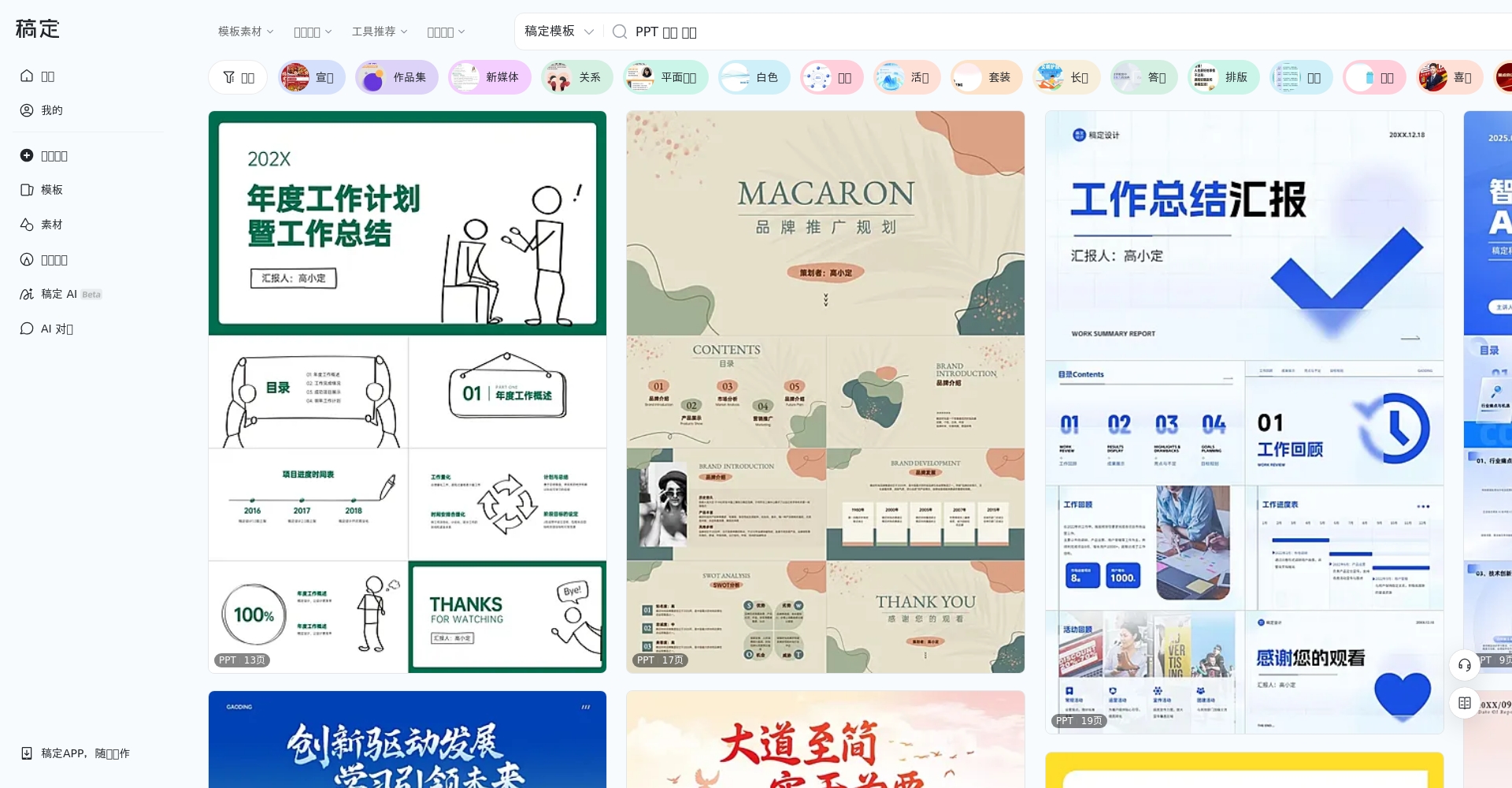
Image/PPT Template Library
Finalized PPTOffering over 20,000 high-quality PPT templates, covering dozens of uses including business reports, teaching materials, marketing, product launches, and company profiles, with diverse styles including minimalist, business, technological, creative, and cartoon. A powerful filtering and tagging system allows users to easily locate the template they need.
The classification methods include: purpose (such as summary report, product display, planning proposal), industry (such as finance, government affairs, Internet, education, etc.), and page style (such as modern, 3D, luxury, cartoon).
Each template comes with a high-resolution preview image and detailed instructions, and you can also try it out online.
All templates are in PPTX format and support free editing with 100%.
The GaoDing PPT plugin is integrated into both Windows and Mac systems. Users can directly access the plugin through the PowerPoint (PPT) menu or run it as a standalone app on Mac. Some key highlights are as follows:
Remove image backgrounds with one click, greatly saving time in processing PPT materials.
Image cropping
Supports advanced image layout features such as matrix batch cropping and circular arrangement.
Unify font/replace font
Unify global fonts with one click to meet the visual specifications of multiple brands.
Insert shape/icon
Includes a large number of regular polygons and flat icons to enrich the visual elements of the page.
Free line spacing and margin
Customize font spacing and element margins to easily achieve advanced typography.
Boolean operations/Layers panel
Supports object merging and splitting, as well as intuitive layer visualization, greatly improving the efficiency of editing complex pages.
Smart scaling
Ensure the page maintains its aesthetic appeal across multiple platforms and prevent image distortion.
The plugin also supports a wealth of design features such as one-click export, long image stitching, inserting materials, and batch replacement, greatly increasing the efficiency of PPT production.
Interact with a vast array of 2D and 3D characters and experience truly unlimited AI role-playing dialogue. Join now! New users receive 6000 points upon login!
GaoDing PPT not only offers templates, but also a massive resource library, including:
Icons, images, artwork, etc., can be dragged and dropped into the page with one click.
A wide variety of data chart styles (customizable color schemes and fonts)
Rich dynamic graphics and information visualization elements
We maintain a high frequency of material updates, with new resources launched every month.
4. Online editing and collaboration
Image/PPT online collaboration screen
Fully supports online PPT editing, with intuitive operation and WYSIWYG (What You See Is What You Get) interface.
Real-time collaboration/commenting with multiple users, supports team projects and custom cloud templates.
After editing, you can export to PPTX, PDF, or image formats with one click.
—
Price and Solution for Drafted PPT
Finalized PPTAdhering to the principle of "high quality and affordability", we adopt a membership subscription system to provide users with flexible payment options.
Image/PPT Membership Price Comparison Table
Membership Types
Price (for reference)
Rights and Benefits Statement
Monthly Individual Member
From ¥4.9/month
Download all PPT templates and materials, and unlock all plugin functions.
Annual Individual Membership
¥49/year
Same as above, enjoy member discounts and download a large number of templates for free.
Enterprise Team Edition
Customized quote
Supports team member management, cloud collaboration, and more priority services.
Note: Some basic templates and features are permanently free, but advanced templates, professional plugins, and automatic material refresh are only available to members. Register to receive a limited-time free trial of the optimized experience.
—
How to use Gaoding PPT
Whether you're a new user or a seasoned PowerPoint expert, Gouding PPT is incredibly easy to use. The steps are as follows:
Finalized PPTWith its flexible and powerful AI office tool attributes, it is suitable for a wide range of people, mainly including:
Image/PPT team collaboration scene
Business peopleReports, proposals, year-end summaries, company presentations
Teachers and studentsTeaching materials, defense, thesis/project presentation
Marketing and planning personnelMarketing plans, advertising proposals, creative showcases
Entrepreneurs/Pitching ContestantsInvestment PPT, Business Plan
Professional PPT DesignerThe customizable modules and plugins offer a wealth of features.
Corporate TeamCollaborative office work, team knowledge base, unified visual standards
Users of different levels can...Finalized PPTQuickly finding templates and tools that meet your needs is a widely used AI office tool for today's professionals.
—
User reviews and industry reputation of Gaoding PPT
GaoDing PPT has received industry acclaim for its aesthetically pleasing templates and powerful plugin functionality. Real feedback from internet companies, the education sector, custom designers, and ordinary working professionals is as follows:
Image/Screenshot of user reviews
User type
User Experience
Internet company operation
“"There are many well-designed templates available, and single-page templates can be inserted as needed, saving you time and effort!"”
University teachers
“"It's amazing that someone without design skills can create a professional-grade PPT!"”
Corporate Planning Manager
“"It saved a lot of time on planning, and the company's presentation PPT was completed with ease."”
Custom PPT Designer
“"Plugins facilitate daily creation and meet the detailed needs of professionals."”
Entrepreneurs/Students
“"Abundant templates ensure victory in every defense and pitch!"”
veteran employees
“"After using the plugin, PPT became an essential tool for promotion and greatly enhanced my personal image."”
Finalized PPTWith its AI features and industry-leading number of templates, it demonstrates a clear advantage over similar office AI tools.
—
Frequently Asked Questions
1. Which PPT software versions does the GaoDing PPT plugin support?
at present,DraftPPT PluginSupports Microsoft PowerPoint on Windows, most PowerPoint and Keynote on Mac. Some new features require the latest version of the plugin or app to experience; see details.Plugin Details & Compatibility。
2. Does membership support unlimited downloads of all templates and materials?
Yes.After activating your membership, you can download and use all PPT templates, materials, icons, and other content without restrictions.This includes access to the latest online resources, and members enjoy benefits such as automatic synchronization, batch downloads, and dedicated customer service. Non-members can only use some free templates and basic functions.
3. Can the downloaded PPT template be used commercially?
Most templates and materialsCommercial use permittedHowever, some elements involve third-party authorization, so please read carefully.User AgreementAlternatively, check the commercial use scope on the download page. For any questions, please contact the platform's customer service.
—
In the era of digital officeFinalized PPTWith its vast library of high-quality resources, uniquely designed AI-assisted plugins, flexible pricing options, and excellent industry reputation, it has become a "secret weapon" for users in various fields, including the workplace, academia, and entrepreneurship, to improve their PPT creation skills. If you'd like to embark on an efficient and professional PPT journey, why not try it now?Gaoding PPT Official WebsiteAlternatively, download and install the plugin to experience the new empowerment brought by AI office tools.
Interact with a vast array of 2D and 3D characters and experience truly unlimited AI role-playing dialogue. Join now! New users receive 6000 points upon login!
Finalized PPTThe number of visitors has reached 144. If you need to check the site's ranking information, you can click "..."."5118 Data""Aizhan Data""Chinaz data""Based on current website data, we recommend using Aizhan data as a reference. More website value assessment factors include:"Finalized PPTAccess speed, search engine indexing and volume, user experience, etc.; of course, to evaluate the value of a website, the most important thing is to base it on your own needs and requirements, and some specific data will need to be obtained from [research institutions/resources].Finalized PPTWe will negotiate with the website owner to provide information such as the website's IP addresses, page views (PV), and bounce rate.
aboutFinalized PPTSpecial Announcement
This site's AI-powered navigation is provided by Miao.Finalized PPTAll external links originate from the internet, and their accuracy and completeness are not guaranteed. Furthermore, AI Miao Navigation does not have actual control over the content of these external links. As of 10:52 AM on July 25, 2025, the content on this webpage was compliant and legal. If any content on the webpage becomes illegal in the future, please contact the website administrator directly for deletion. AI Miao Navigation assumes no responsibility.