
GitHub Copilot Tutorial: A Complete Beginner's Guide to an Essential AI Programming Assistant for Programmers by 2025 (Including Installation and Practical Tips)
GitHub CopilotPowered by AI, every programmer should have a copy by 2025! This article provides an in-depth analysis of Copilot.Installation process, core functions, and practical tipsThis will help you quickly master the new era of intelligent coding.Suitable for both novice and advanced developersWhether for personal projects or corporate collaborations, this article will help you improve coding efficiency and revolutionize the development experience!

What is GitHub Copilot? How is AI changing development?
- GitHub Copilot Based on OpenAI Codex, we continuously learn from a vast amount of open-source code.Intelligent prediction and code completion。
- Supports mainstream programming languages: Python, JavaScript, Java, C++, etc.Suitable for both beginners and experienced developers。
| AI characteristics | Substantial benefits for developers |
|---|---|
| Intelligent real-time completion | Reduce typing, reduce errors, and increase programming speed. |
| Supports multiple mainstream editors | Fully supports VS Code and JetBrains, ready to use anytime. |
| Quick to learn | Easy to install and configure. |
| Adopting the latest AI technology | Continuous learning and adaptation to various needs and scenarios |
| Automatically generate comments and tests | Documentation and testing completed in one go |
News Flash: Copilot has increased the average coding speed of developers worldwide.55% and above! (See details)Official report)
GitHub Copilot Tutorial: Complete Installation and Setup Process
How to install the Copilot extension
- Using the VS Code editor as an example:
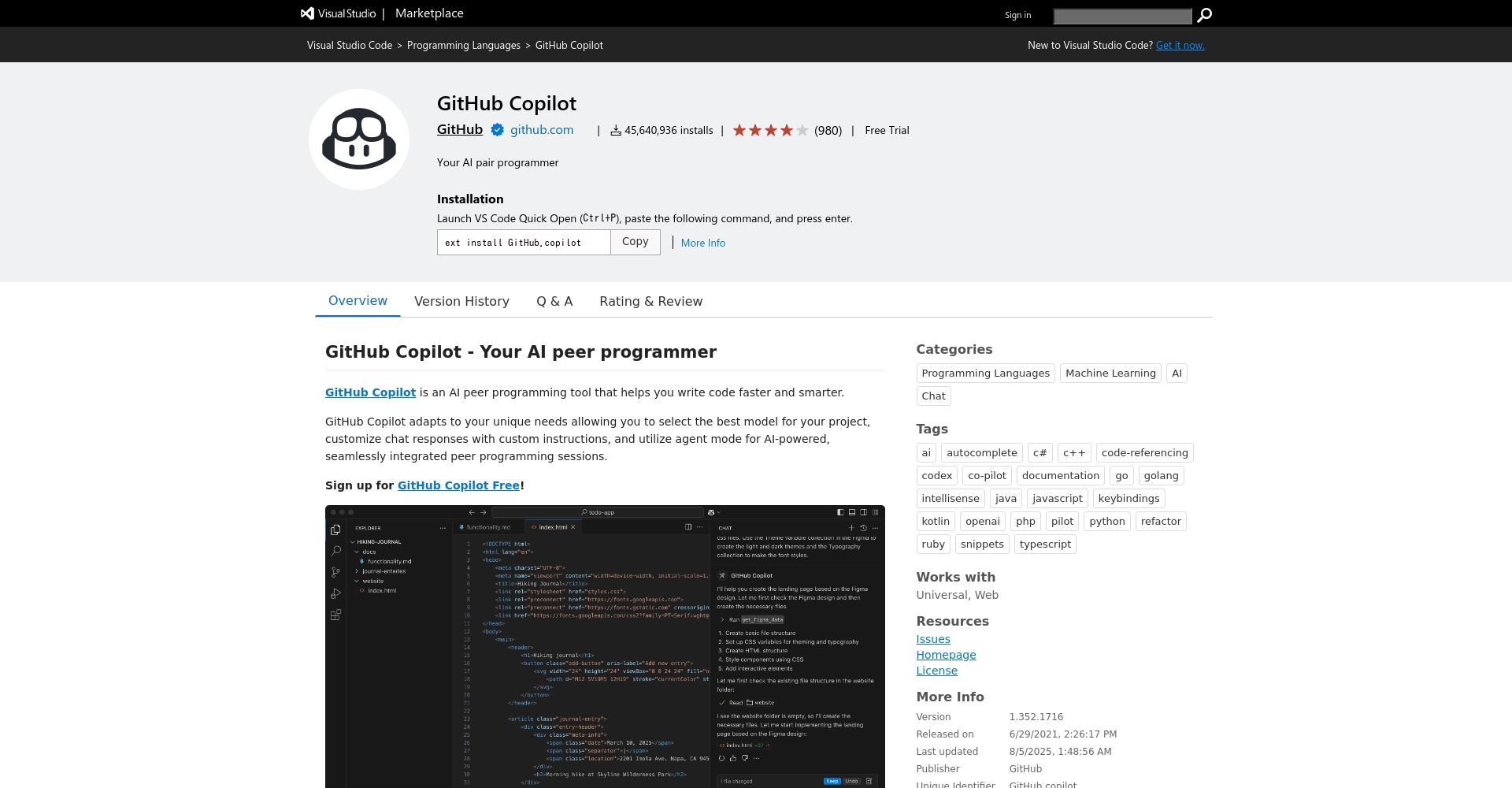
- Open VS Code and go to the Extensions panel.
- Search for "GitHub Copilot".
- Click to install.,

Photo/GitHub Copilot plugin installation interface It will be completed in a short time.
- JetBrains IDE users: Go to Settings > Plugins, search for and install Copilot.
- Neovim User: ReferenceOfficial GuidelinesInstall plugins.
For more detailed information, please seeCopilot Official Tutorial。
Log in to GitHub and enable Copilot
- The first time you log in after installation, you will need to log in with your GitHub account. Just follow the prompts in a few steps.
- No account?Click here to register!
Advanced settings and personalized optimization
- Search in VS Code Copilot: Settings。
- Adjust according to demandSuggested quantity/auto-completion/language preference。
| Common settings | illustrate | Recommended value |
|---|---|---|
| Suggestion Count | Each prompt offers several ways to write it. | 3-10 |
| Enable Auto-complete | Is auto-completion enabled? | It depends on individual needs. |
| Exclude Languages | Excluding certain languages | Choose according to job |


Four Essential Functions Analyzed: Unlocking Copilot's Productivity
1. Intelligent code completion
Copilot predicts your next code step, eliminating the need to manually input tedious logic; simply press Tab to complete it.
- Enter part of the function/variable name and it will be automatically completed.
- Use the up/down keys to switch between multiple suggestions for easy selection.
Image/AI code completion
2. Automatically generate code snippets with multiple solutions
按 Ctrl+Enter(For Mac, use Command+Enter)You can choose from up to 10 different ways to write it.It allows for easy comparison of multiple styles.
| operate | Effect |
|---|---|
| Enter comments/fragments | Provide relevant understanding and sample code. |
| Call multiple suggestion windows | Comparison of various implementation styles |
3. Automatic generation of Docstrings and comments
Type a comment or Docstring to directly complete the definition.This significantly improves the readability of team code.

- Suitable for automatically adding comments to large projects in batches.
- When needs change frequently, quick completion is the most considerate feature.
4. Unit tests are automatically generated.
Simply describe your test requirements, and Copilot can generate a complete test function/test class with a single click.Perfectly compatible with mainstream frameworks.Completely accelerate automated testing。
| Test type | Copilot Support Scenarios |
|---|---|
| Python Unit Test | Auto-completion of the test_ function and mock code |
| JavaScript/Jest | Automatically generate describe/it structure tests |
| Java/JUnit | Quickly generate @Test annotated methods |
GitHub Copilot: Thrilling Practical Techniques
Quick Enable/Disable
- Windows:Alt+\
- Mac:Option+\
- You can also switch directly in the Copilot panel.
Mastering the essentials of semantic input
Detailed and clear comments and descriptions (such as "Sort a list of integers in reverse order.") can make Copilot completion more accurate.
Make full use of the open source ecosystem
- Standardized naming and clear annotationsYou can get better AI suggestions and help you connect with open source projects.
Copilot pricing plans and supported languages
| plan | Monthly/Annual Fee | Supported languages |
|---|---|---|
| Copilot for Individuals | $10/month or $100/year | Python, JS, Java, Go, C++, etc. |
| Copilot for Business | $19/user/month | Corporate Policy and Compliance Management |
| Copilot for Students/Teachers | free | Support language for individuals |
See detailsCopilot official website | Copilot Cost Analysis
GitHub Copilot Tutorial: New Trends in AI Empowerment for Enterprises and Teams
Copilot has become an essential tool for digital transformation, helping teams standardize development, automate testing, and train new users.It has been included by global companies. DevOps ProcessStandard configuration, accelerating a new model of human-machine collaboration.

To explore Copilot enterprise solutions, please contact us.Nextlink GitHub Expert。
Summarize
With the AI wave sweeping the development community by 2025, GitHub Copilot tutorials and applications have become essential skills for programmers.Once you master the installation, debugging, and four high-efficiency functions introduced in this article, you can handle both personal projects and enterprise-level development.Both can significantly improve productivity and code quality.The new era of AI programming has arrived.Start your Copilot journey now and make intelligent code your advantage!
Further Reading:
- What is GitHub? A comprehensive guide to GitHub usage and features.
- What is Git? A Complete Guide to Version Control
- Consult Copilot Enterprise/Team Integration Now
Let AI help you free your hands and surpass your limits!
© Copyright notes
The copyright of the article belongs to the author, please do not reprint without permission.
Related posts




No comments...
